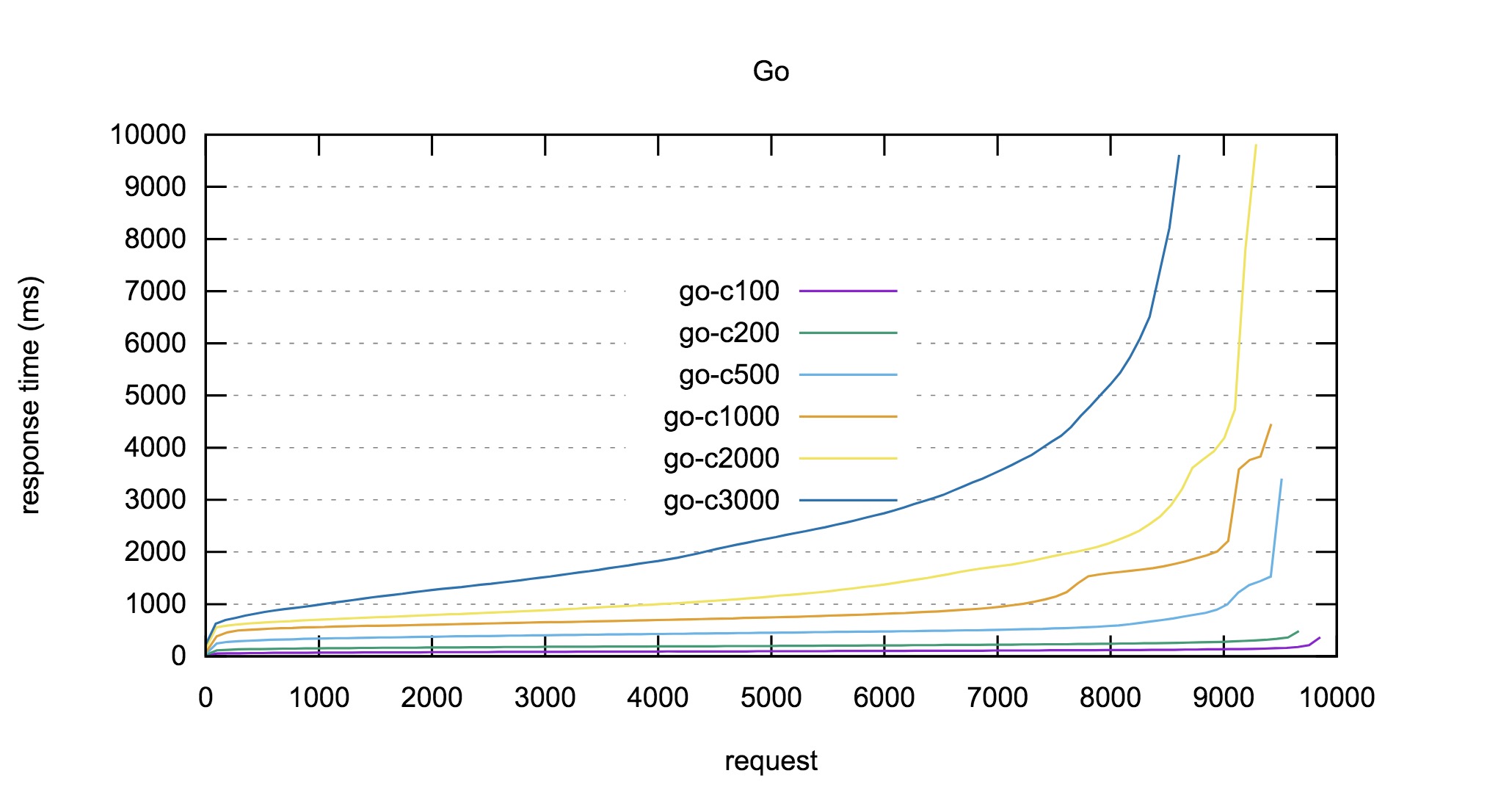
前几天用 Go 重写 PHP 接口时,顺便做了个性能对比,使用 Apache Ab 进行压力测试后,把相关数据使用 Gnuplot 生成图表。
Gnuplot 是一款开源的、功能强大的数据可视化处理软件, 第一次使用,简单做个笔记。
HUGOMORE42
安装 Gnuplot(Mac)
由于新版本 MacOS 已经不再初始安装 XQuartz ,
所以需要在 XQuartz 项目网站 下载 .dmg 文件安装 XQuartz。
也可以通过 brew cask 进行安装:
1
|
brew cask install xquartz
|
- 安装 Gnuplot
然后可在官网下载 Gnuplot 的 dmg 包或者直接使用 brew 安装即可:
1
2
3
|
brew install gnuplot --with-x11
# 或者
brew install gnuplot --with-qt
|
安装完成后就可以在终端里使用 gnuplot 命令进行 Gnuplot 的界面了:
 1
 2
 3
 4
 5
 6
 7
 8
 9
10
11
|
	G N U P L O T
	Version 5.2 patchlevel 2    last modified 2017-11-15

	Copyright (C) 1986-1993, 1998, 2004, 2007-2017
	Thomas Williams, Colin Kelley and many others

	gnuplot home:     http://www.gnuplot.info
	faq, bugs, etc:   type "help FAQ"
	immediate help:   type "help"  (plot window: hit 'h')

Terminal type is now 'qt'
|
可以直接在 Gnuplot 里进行命令交互, 不过最好是把这些命令编辑在一个脚本里然后使用 gnuplot file 的方式运行。
Apache Ab 数据格式
在使用 Apache Ab 进行压测时,可使用 -g (gnuplot-file) 参数将指定本次测试的请求数据输出到指定文件。如:
1
|
ab -c 200 -t 10 -g ./php_200.dat http://xxx.com/xxx
|
该大概格式如下:
 1
 2
 3
 4
 5
 6
 7
 8
 9
10
11
12
13
14
|
head -n 5 php_200.dat
starttime	seconds	ctime	dtime	ttime	wait
Sun Feb 11 21:11:12 2018	1518354672	2	78	79	63
Sun Feb 11 21:11:12 2018	1518354672	13	443	457	443
Sun Feb 11 21:11:12 2018	1518354672	13	447	460	447
Sun Feb 11 21:11:12 2018	1518354672	14	448	462	448

head -n 5 go_200.dat
starttime	seconds	ctime	dtime	ttime	wait
Sun Feb 11 21:12:41 2018	1518354761	2	25	26	9
Sun Feb 11 21:12:43 2018	1518354763	1	57	58	57
Sun Feb 11 21:12:47 2018	1518354767	1	83	84	83
Sun Feb 11 21:12:45 2018	1518354765	1	87	89	87
Sun Feb 11 21:12:43 2018	1518354763	2	88	89	88
|
各列含意如下:
starttime 开始时间seconds Unix 时间戳ctime 建立连接的时间(connection time, ms)dtime 服务器处理的时间(processing time? , ms)ttime 花费的总时间(total time, ctime+dtime?)wait 服务器收到请求到响应第一个字节的时间
这几个时间的关系如下图:

用 Gnuplot 生成图表
先创建一个 Gnuplot 模板文件 go.tpl :
 1
 2
 3
 4
 5
 6
 7
 8
 9
10
11
12
13
14
15
16
17
18
19
20
21
22
23
24
25
26
27
28
29
30
|
# 输出格式
set terminal svg

# 输出文件名
set output "benchmark_go.svg"

# 图表标题
set title "Go"

# x,y 轴缩放比例
set size 1,0.7

# 以Y轴数据为基准绘制栅格(决定图表中虚线是横向还是纵向)
set grid y

# 图例的位置
set key center

# x,y 轴标题
set xlabel "request"
set ylabel "response time (ms)"

# 执行 plot 命令进行生成操作
# 并指定数据文件、曲线风格、以第9列数据(数据文件中以空格分隔的列,本例中对应 ttime 列)为基准数据绘图
plot "go_100.dat" using 9 smooth sbezier with lines title "go-c100", \
"go_200.dat" using 9 smooth sbezier with lines title "go-c200", \
"go_500.dat" using 9 smooth sbezier with lines title "go-c500", \
"go_1000.dat" using 9 smooth sbezier with lines title "go-c1000", \
"go_2000.dat" using 9 smooth sbezier with lines title "go-c2000", \
"go_3000.dat" using 9 smooth sbezier with lines title "go-c3000"
|
然后在终端执行 gnuplot go.tpl 即可在当前目录生成 benchmark_go.svg 文件, 大概文件就是这样的啦: